How invite-only TradingView scripts actually work
An invite-only TradingView script places zero orders and can touch zero dollars of your money. That is the question almost everyone asks first, so we answer it first. The script is an indicator that draws lines and fires alerts on your chart, not a robot wired to your broker. The script type cannot route an order at all, so no vendor could switch that on even if they tried.
The rest is simple. An invite-only script is code the author keeps private but grants specific users permission to run. You do not see the source. You do run the tool. Access is tied to your TradingView username, one person at a time, and the script plots on your own chart and fires alerts.
Ours plots the same five-strategy NQ engine behind our published 3,500-trade book. Because it runs on your feed, our signals regenerate on your screen instead of arriving as a screenshot. Below is exactly how the access works, what the script can and cannot do, and the one honest limit we will state plainly.
An indicator draws and alerts, it cannot trade
Green is what the script does. Red is what it cannot do. The money question is settled in one glance.
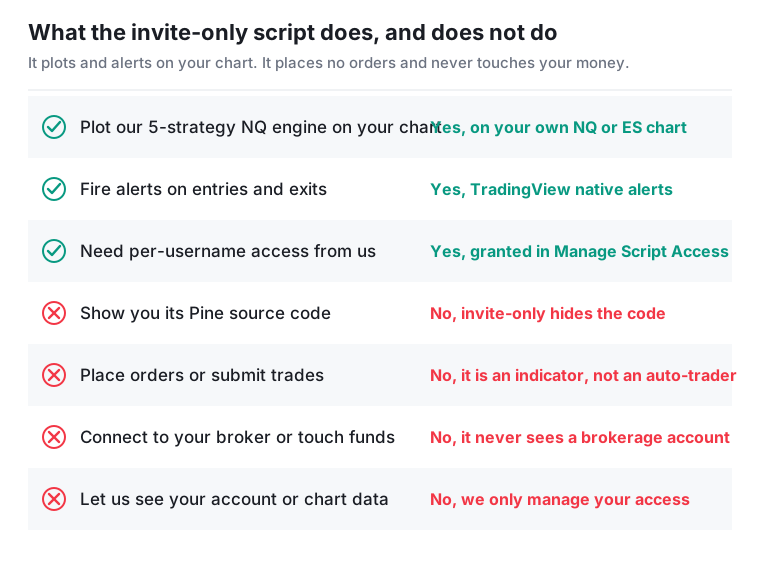
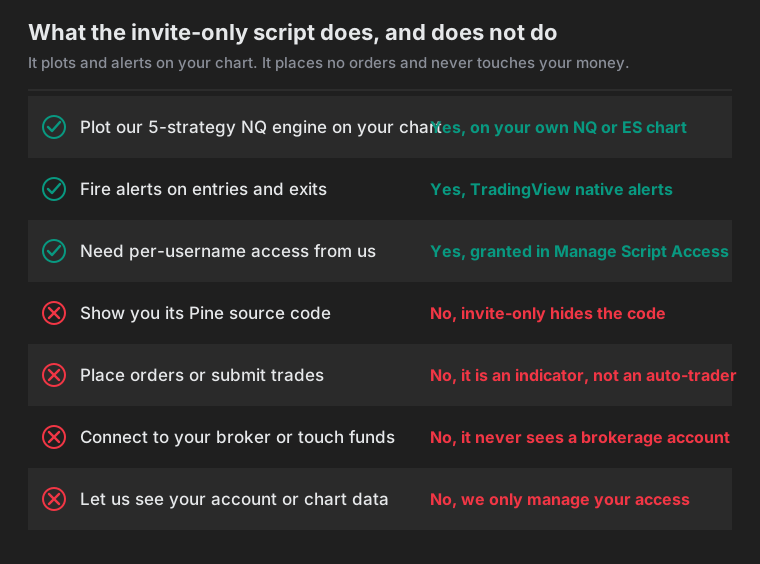
Read the red rows first, because that is where the worry lives. An invite-only script is an indicator, also called a study. It runs on the bars of your chart, draws lines, and sends alerts. That is the full extent of its power. It has no connection to a brokerage account and no way to route an order.
The green rows are what you pay for. It plots our engine on your chart and fires alerts when that engine enters or exits. The next section draws that automation line precisely, because it is the question most people arrive with.
Can you auto trade NQ futures with it? No, and here is the exact line
Search "auto trade NQ futures" and you get a wall of tools promising a hands-off account that prints money while you sleep. We are the boring, honest entry in that list. Our script automates the watching, the math, and the alert. You still decide whether to take the trade, place the order with your own broker, size it for your own risk, and manage it. The analysis is automated. The execution never is.
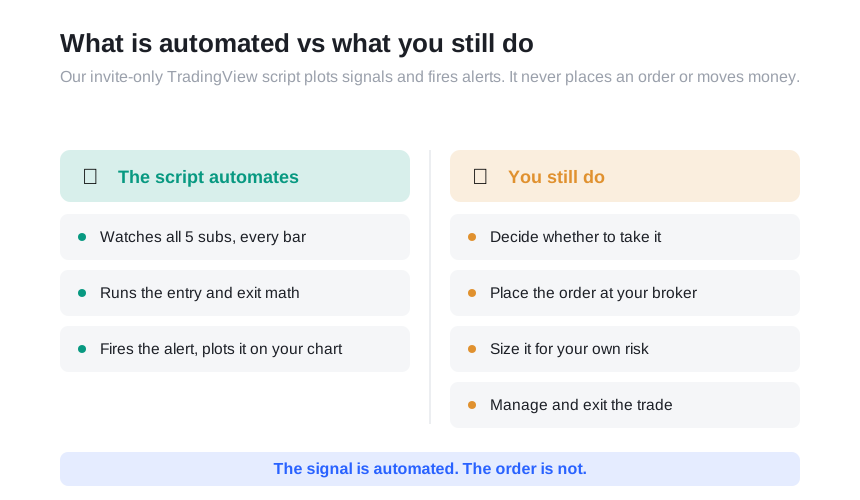
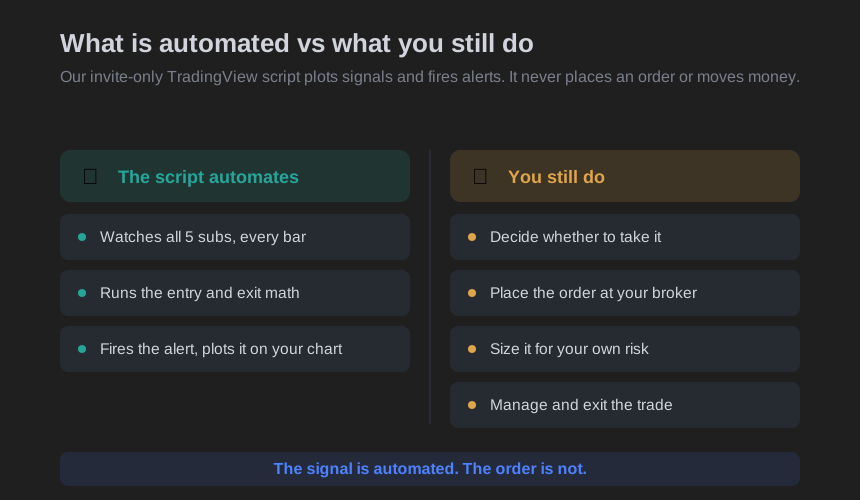
Three things happen without you lifting a finger. First, the watching: the script evaluates all five subs on every bar, all session, whether you are at the screen or not. Second, the math: the entry and exit logic that defines each sub is computed the same way every time, with no discretion and no mood. Third, the alert: when a sub triggers, the signal is plotted on your chart and an alert is sent. That much is genuinely useful, because the tedious, error-prone parts of a systematic approach are exactly the watching and the disciplined math, and a machine does those without getting tired or talking itself out of a rule.
Nothing past that point is automated. The script does not connect to your broker. It does not place, modify, or cancel an order. It does not move money, and it cannot, because it has no access to your account and no authority over it. When an alert fires, nothing has been traded. You read the signal and you decide. The parts that carry the actual risk stay with you: whether to take the trade at all, placing the order in your own platform, choosing your contract count, setting your own stop, and managing the exit. If you are away from your desk when an alert fires, no trade happens on your behalf.
That is the design, not a limitation we are apologizing for, and it is why the script type matters so much. An indicator cannot route an order, so this is a boundary the platform enforces rather than a promise you have to take on trust. Automating the analysis is a real edge. Automating away your own judgment is how people in this corner of the internet get hurt.
Invite-only locks both the code and who can run it
TradingView gives an author three ways to publish, and the choice decides two things: who sees the code, and who can run the tool.
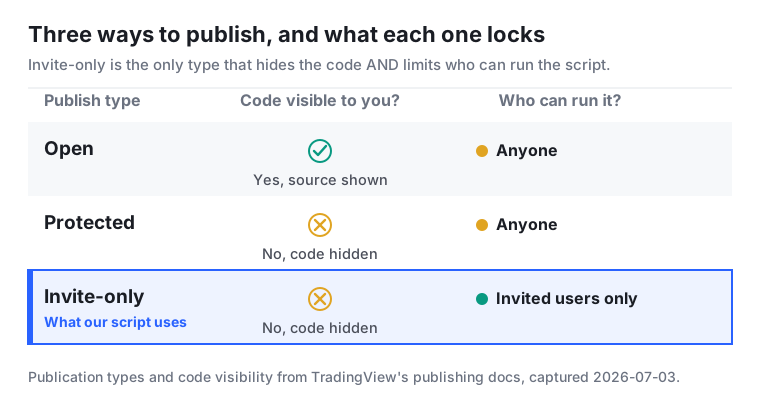
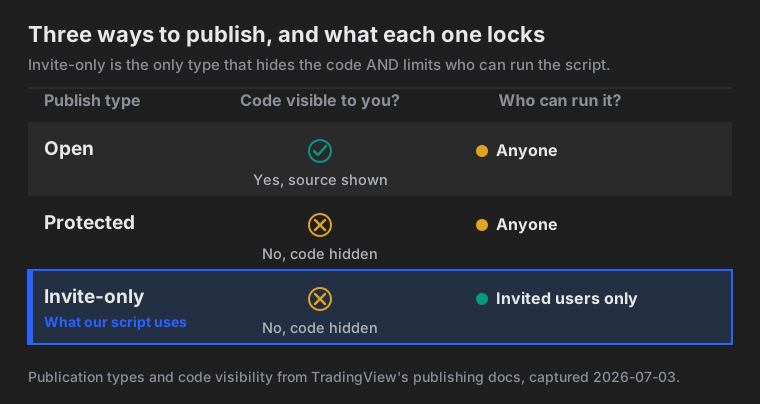
Open scripts show everyone the code. TradingView: "The Pine Script code of scripts published open is visible to all users." Anyone can read it and copy it. Protected scripts hide the code but let anyone add the tool. TradingView: "The code of protected scripts is hidden from view ... protected scripts can be used freely by any user."
Invite-only does both at once. In TradingView's words, "The invite-only access type protects both the script's code and its use." The code stays hidden, and only invited users can run it. That is why paid signals use it: the author controls who can add the script at all, and TradingView notes that access "will usually require payment" to the author.
So buying access means two things at once. You cannot see the code, and not everyone can run it. That sounds like a black box. For our script it is the opposite, and the reason is mechanical.
Access is granted by hand, to your username, one person at a time
Access is not automatic and not open to the public. The author adds you by hand, to your username, through TradingView's own dialog.
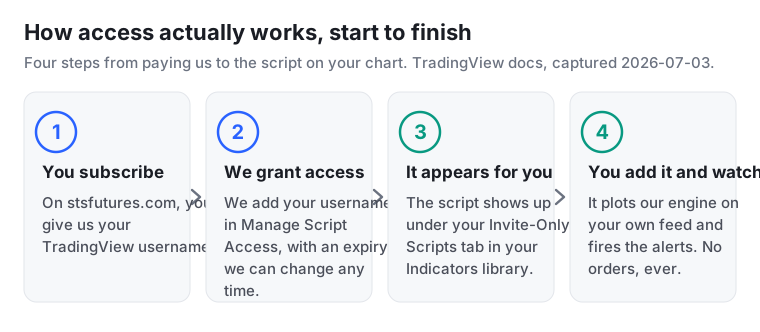
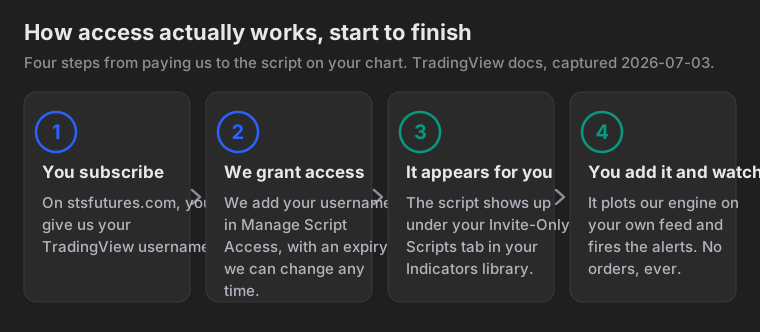
First, you subscribe on our site and give us your TradingView username. That username is the only thing we need, and the only thing we get.
Second, we grant access. TradingView's blog describes the dialog: "When adding a new user in the Manage Script Access dialog, you'll now need to specify the dates to which your script guests are granted access." Each grant can carry an expiration date, or none. TradingView adds that "You can even apply the settings to grant access without an expiration date," and that an author "can change the expiration date settings ... at any time." Access is per-user, dated, and editable later.
Third, the script appears for you. TradingView's help center says the Invite-Only Scripts tab in your Indicators library "appears as soon as a user is given access to an Invite-Only script (access to such indicator is given only by its author)." Before the grant, that tab is not even there.
Fourth, you add it to your chart. It plots our engine on your own NQ or ES bars and fires alerts through TradingView's native alerts. You did the last step yourself, on your own feed.
One thing this list leaves out on purpose. At no point does the author see your account, your positions, or your chart data. TradingView exposes an access list to the author, nothing more. We manage whether your username can run the script. We do not see what you do with it.
Hidden code, but the signals regenerate on your screen
A private code base is exactly what a skeptical buyer should distrust. A black box asks for faith. This one does not, because the script is not a picture of our trades. It is the actual logic, running on the actual bars on your chart.
When our engine enters, it enters on your screen too, on your feed, at the price your chart shows. You are not trusting a screenshot that could have been cropped from one good week. You watch the system draw its own signals in front of you, live.
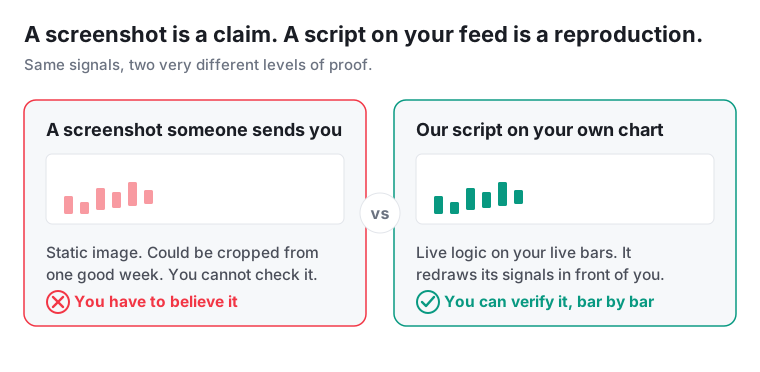
A screenshot is a claim. A script on your own feed is a reproduction. We made the full case in why a screenshot proves nothing next to a system that reruns on your own chart. Hidden code and a checkable signal do not conflict. The code stays ours. The output is yours to check, bar by bar.
The table below lines up the two on the attributes a buyer actually cares about. Every row is a point argued above: the screenshot is a static image you cannot check, and the live script redraws its own signals on your bars while still placing no orders and touching no money.
| What you actually get | A static screenshot someone sends you | Our live invite-only script on your chart |
|---|---|---|
| Updates each bar as price moves | No, frozen at the moment it was captured | Yes, it recomputes on every new bar of your feed |
| Draws entries and exits on your own chart | No, it is a picture of someone else's chart | Yes, it plots on your own NQ or ES bars |
| Can be back-dated, cropped, or faked | Yes, it could be cropped from one good week | No, the logic runs live so there is nothing to crop |
| Verifiable by you, bar by bar | No, you have to believe it | Yes, you watch it redraw in front of you |
| Places orders or touches your money | No, but it also proves nothing | No, it is an indicator and places zero orders |
| Lets the author see your account or chart data | No | No, we only manage whether your username can run it |
The script plots one specific 5-strategy book, not a generic indicator
It plots one specific book: five systematic NQ strategies that run as a single-position portfolio, one trade on at a time. The published record behind it is the STS NQ book, 3,500 trades and $1,112,232 net, backtested from August 2011 through August 2026 on the NQ mini, sized at one to three contracts by volatility, with commissions and slippage included. The style is momentum and trend continuation, intraday plus one overnight model. Not mean reversion, not scalping.
Each sub watches a different slice of the day: an early-session play, an opening-range play, a short setup, an overnight hold, and an intraday trend follower. A sixth sub has been retired. Because the five share one position, the engine is not firing five separate trades at once. It resolves them into a single net stance and shows you that one position. The subs are close to independent, with an average pairwise correlation of 0.11, which is why combining them into one book smooths the ride rather than stacking the same bet five times over.
On your chart that arrives as markers on the price where each entry and exit happened, labelled with which sub fired, so you are not staring at an anonymous arrow wondering where it came from. When the position changes, the plot changes with it and the alert goes out.
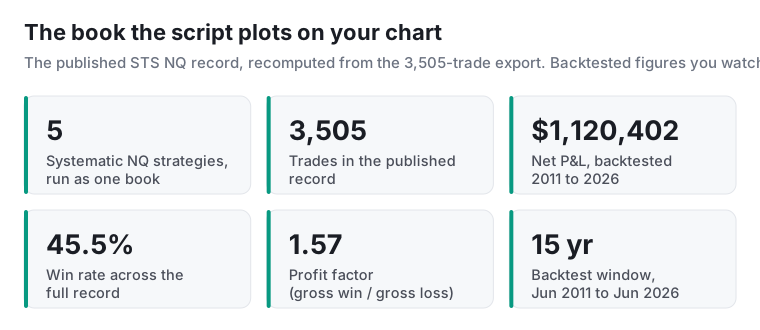
The drawdowns belong in the same breath as the profit. The worst dollar drawdown in that record was $51,836, which was 4.3% of the peak it fell from. The worst in percentage terms was a separate, earlier episode of 20.4%. Those are two different events and we never present them as one figure. On the micro contract (MNQ) the dollars scale by roughly one tenth, so about $111,223 net and about a $5,184 drawdown, at the same win rate and the same ratios.
These signals come from our own book. We trade this engine with real money and we sell access to the same signals, which is a conflict we would rather state than have you discover. It also aligns us with you in one specific way: the engine you subscribe to is the engine we run, not a watered-down demo.
That context is what makes "verify on your own feed" mean something. There is a real, published book to reproduce. See how the five strategies fit together on our strategies page, and the full trade-by-trade record with every drawdown on the 15-year tear sheet. The script is how those signals reach your chart in real time.
The one limit we will state plainly
Here is what the script cannot promise. The record it plots is a TradingView backtest. We do not yet publish a live-fill track record with real broker fills. The published performance is hypothetical backtest history, not a log of money made in a live account.
Be precise about what that means. Watching the script fire on live bars proves the signals are real and arrive in real time, at prices your own feed shows. It does not, by itself, prove the backtested dollar figures, because a backtest assumes fills a live account may not get. Those are two different claims, and we will not blur them.
This is also where the manual last step shows up in your P&L. A plotted signal is a price on a chart. Because you place the order yourself, your real result depends on your slippage, your latency between the alert and your order, your fills, and your own management of the trade. Two subscribers taking the same alert can end a month in different places for exactly those reasons, and neither of them will match the backtest to the dollar.
What live watching gives you is forward evidence you collect yourself, on your own chart, with no screenshot in between. And because the gap between a clean backtest and messier live results is real for every system, we published why your live drawdown usually runs deeper than the backtest before anyone asked.
See the alerts arrive before you add the script
Full Access sends the same entry and exit signals to your email and dashboard. You can watch the alerts arrive and time them against live NQ before you put anything on a chart.
The invite-only script is part of Full Access too, so the signals plot on your own chart and fire through TradingView's alerts instead of only landing in your inbox. Both plans are on the pricing page, and you can cancel anytime. Start with the alerts, then put the script on the chart whenever you are ready.
How we sourced the mechanics
Every platform mechanic here traces to TradingView's own public documentation, captured 2026-07-03: the three publication types and code visibility from the Pine Script publishing docs and the script-security help page; the Manage Script Access dialog and editable expiry from TradingView's official blog on access expiration; the Invite-Only Scripts tab from the help center page on that tab; and the "control access" and "usually require payment" lines from the private-scripts help page. Platform features change, so we date these claims and re-check them when we update this piece.
The book context, five strategies, 3,500 trades, and $1,112,232 net, comes from our own canonical record, the same figures every number on this site reconciles to. We describe TradingView's platform and our own product; we are not affiliated with TradingView.
Stop letting the hidden code be the reason you distrust a signal. Put the script on your own NQ or ES chart and let it redraw its entries and exits on your live feed, then judge those bars instead of a screenshot. Full Access includes both the script and the alerts, and you can cancel anytime.
Disclosure. We trade this NQ book live and sell access to the signals, so judge the data accordingly. This article is educational and is not investment advice, a recommendation, or an offer to buy or sell any security or futures contract. We are not affiliated with TradingView; platform mechanics described here were captured on 2026-07-03 and can change.
Hypothetical performance disclaimer (CFTC Rule 4.41). The results described here are based on backtested and hypothetical performance. Hypothetical performance results have many inherent limitations, some of which are described below. No representation is being made that any account will or is likely to achieve profits or losses similar to those shown. In fact, there are frequently sharp differences between hypothetical performance results and the actual results subsequently achieved by any particular trading program. One of the limitations of hypothetical performance results is that they are generally prepared with the benefit of hindsight. In addition, hypothetical trading does not involve financial risk, and no hypothetical trading record can completely account for the impact of financial risk in actual trading. For example, the ability to withstand losses or to adhere to a particular trading program in spite of trading losses are material points which can also adversely affect actual trading results. There are numerous other factors related to the markets in general or to the implementation of any specific trading program which cannot be fully accounted for in the preparation of hypothetical performance results and all of which can adversely affect actual trading results.
Past performance does not indicate future results. Futures trading involves substantial risk of loss and is not suitable for every investor.